Why I Built a Small ID Photo Tool
Every so often our family needs an ID photo: a passport, a visa, some application form. Each time, the photo has to meet the rules.
At first I simply had it taken at Walgreens. Then it seemed I could just take the photo at home, so I started taking it myself and preparing it in GIMP: cropping it to the required size, getting the head to the right size and position, replacing the background with white. Then I took the file to Walgreens to have it printed.
It worked, but it was never smooth:
- I had to look up the rules every time. A 33 × 48 mm photo has one set of numbers for head height and space above the head; a 2 × 2 inch photo has another. A few months later, I had to look them up again.
- The software experience was hit or miss. Cutting out hair was always the slow part.
- Printing meant another trip. Bring the file to the store, then wait for the prints.
Then we got a printer and photo paper at home, so printing was solved. What was left was the tedious part in the middle: turning an ordinary photo into one with the right size, head position and background.
So I wrote a small tool to do that step. You upload a phone photo; it cuts out the person, sets the required background color, places the head according to the specification, and lays out a sheet you can print directly (4 × 6 in, 5 × 7 in, Letter or A4). Before making the photo, it checks for a few common problems: closed eyes, a turned head, a hand in front of the face, sunglasses, a hat.
At first it ran only on my own computer. After a while, I thought putting it online would be more interesting, so I turned it into a website called SmartIDPhoto.
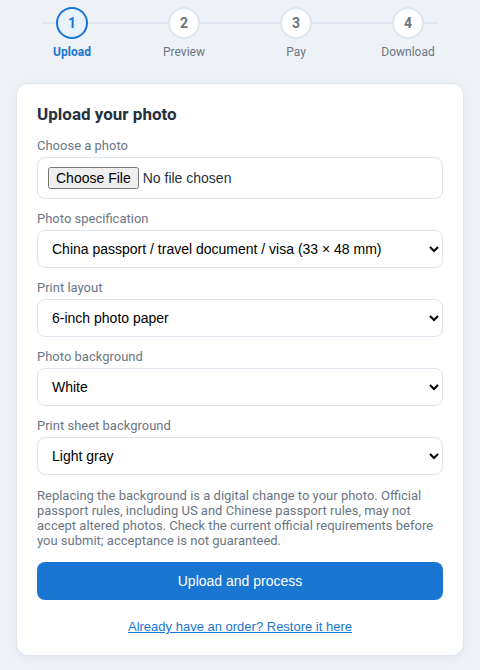
It currently supports these specifications:
- China passport, travel document and visa (33 × 48 mm)
- US passport, visa and green card (2 × 2 in)
- Schengen visa, and Japan and Korea visas (35 × 45 mm)
- Chinese 1-inch and 2-inch photos
It is a paid service. After you upload a photo, you can see a watermarked preview for free, and pay to download only if you are happy with it.
One thing to be clear about: replacing the background is a digital change to your photo, and some official rules may not accept altered photos. Before you submit, it’s worth checking the latest official requirements.
If you’d like to read about the requirements first, there are guides on US passport photo requirements and making a China visa or passport photo at home, and a page of photo sizes. The website is here: SmartIDPhoto.