Why Does Wi-Fi Slow Down Behind a Wall, and Stall When the Microwave Is On?
Optical Fibre: How Does Light Travel Thousands of Kilometres Down a Glass Thread? described how fibre brings the signal to the optical modem at home, usually the full gigabit. Yet carry your phone into a bedroom one or two walls away and the measured speed may drop to a few hundred megabits, or with more walls and distance to one or two hundred; sometimes, when the microwave oven goes on, a video stalls.
For those last few metres the signal travels not in fibre but as Wi-Fi. What is it? Why is it afraid of walls, and of microwave ovens?
Wi-Fi is an electromagnetic wave
Wi-Fi, like visible light, phone signals and the microwaves in an oven, is an electromagnetic wave; only the frequency differs. Home Wi-Fi mainly uses two bands:
- 2.4 GHz: 2.4 billion oscillations a second, a wavelength of about 12.5 cm;
- 5 GHz: 5 billion oscillations a second, a wavelength of about 6 cm.
The newest Wi-Fi 6E and Wi-Fi 7 also use 6 GHz, a wavelength of about 5 cm. These wavelengths are similar to the thickness of a wall and much narrower than a doorway, so in a home the waves pass through walls, reflect, and slip through doorways. The animation below is calculated from Maxwell’s equations: the waves from a router spreading through a flat.
Within a few tens of nanoseconds (billionths of a second) the waves have filled the whole flat, bouncing between the walls. What arrives at each point is the sum of waves from every direction that took different routes: in some places crest meets crest and the signal is strong; in others crest meets trough, they cancel and the signal is weak. That is why moving a phone a few centimetres can change the signal strength it receives.
Why walls block the signal, and more so at higher frequency
As an electromagnetic wave passes through a wall, the material turns part of its energy into heat. Concrete and brick contain moisture and conducting impurities; the wave’s electric field pushes and pulls them back and forth, and they warm up, the same way microwaves heat food in Why is microwaved food hot outside and cold inside?. Each time the field reverses, a little energy is lost; the higher the frequency, the more reversals during the wave’s trip through the same wall, and the more energy is absorbed.
Using building-material data from the International Telecommunication Union, a concrete wall 20 cm thick costs a 2.4 GHz signal about 15 dB and a 5 GHz signal about 25 dB (for decibels see Optical Fibre: every 10 dB is a factor of 10). So through the same wall, about a thirtieth of the 2.4 GHz signal remains, but only about a three-hundredth of the 5 GHz signal. Plasterboard partitions and wooden doors lose far less, from one or two decibels to a few.
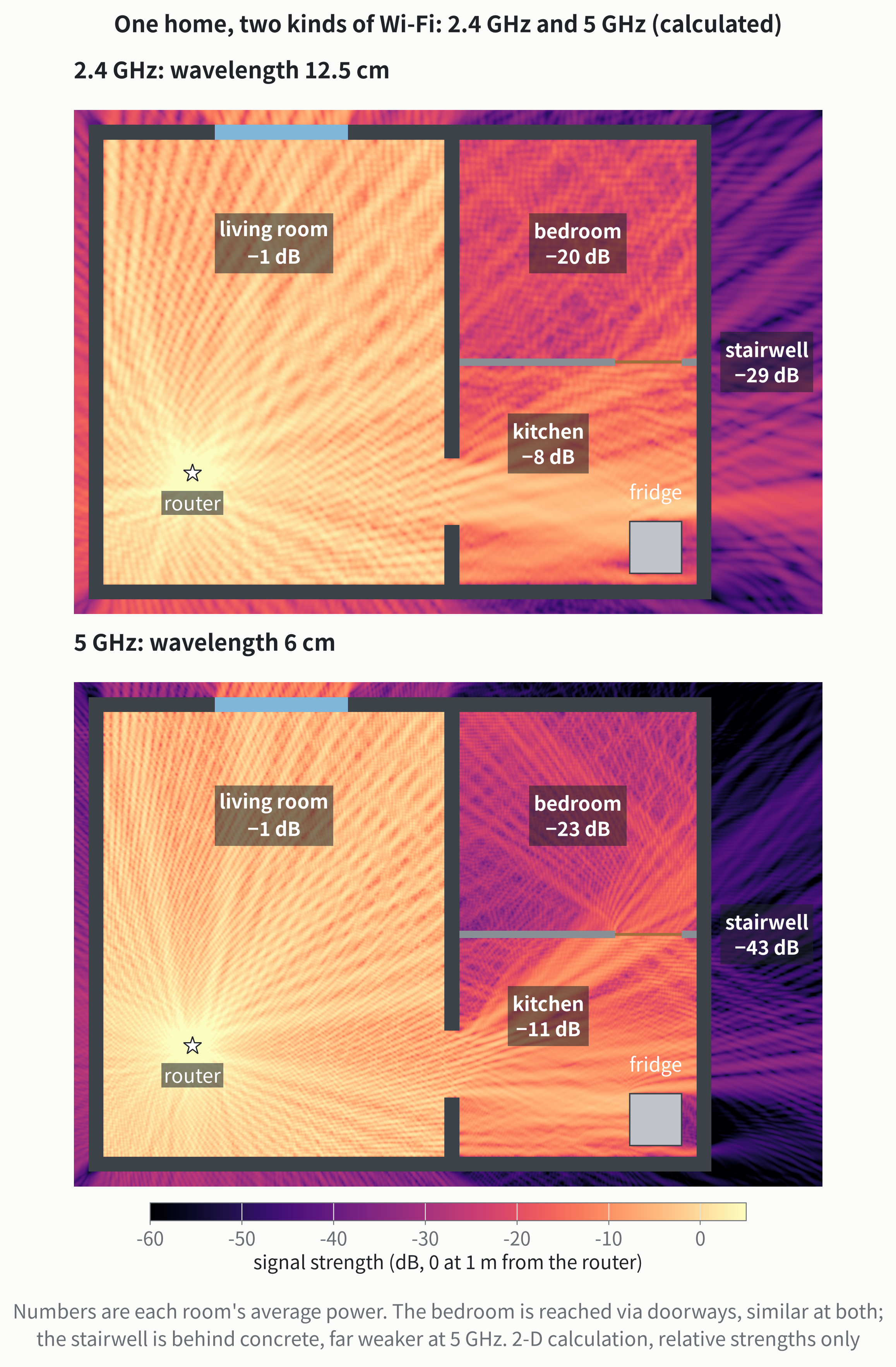
The calculation also shows something else: the signal doesn’t only go through walls; it finds a way. Although the bedroom is behind a concrete wall, its signal arrives mainly through the doorway from the living room into the kitchen and then through a thin partition. So a router is best placed in the middle of the home, in the open, not shut in a cupboard or behind a concrete wall.
Why does a weaker signal mean slower Internet?
A weak signal doesn’t make the data “travel” slower: the waves always move at the speed of light. What drops is how many bits fit in each time.
Wi-Fi packs bits into the strength and phase of the wave (see How does radio carry sound and data to your phone?). When the signal is strong and the noise comparatively small, the router divides the wave into many levels and packs several bits at a time; when the signal weakens, finely divided levels get confused by noise, so it switches to coarser ones and packs fewer bits, and the speed drops. In the Wi-Fi 6 standard:
| Signal at the phone | Bits per step | One 20 MHz channel, per second |
|---|---|---|
| −52 dBm or more | 10 (1024-QAM) | about bits |
| −64 dBm or more | 6 (64-QAM) | about bits |
| −82 dBm or more | 1 (BPSK) | about bits |
dBm is decibels relative to 1 milliwatt; −52 dBm is about 6 nanowatts. A 30 dB drop in signal means nearly 17 times slower. 5 GHz channels can be wider (80 or 160 MHz), much faster than 2.4 GHz close by; but 5 GHz is more afraid of walls, and behind concrete it is sometimes worse than 2.4 GHz. That is why routers now send both, and the phone picks one.
Several small routers: how does mesh Wi-Fi help?
In a large home with many walls, many families buy a mesh system: two or three small boxes such as Deco units, placed in different rooms. They cannot make the waves any better at passing through walls, and each box’s transmit power is limited by regulation, about the same as an ordinary router. What they do is bring the transmitter closer: a node receives the data from the main router and sends it out again at its own power, so around it the signal is much stronger than what comes straight through the walls from the main router. Between the phone and the nearest box there are fewer walls: one concrete wall costs 5 GHz about 25 dB, so one wall fewer means a signal three hundred times stronger.
The boxes share one network name, and as you walk around the phone switches to whichever is stronger (usually only once the old one has clearly weakened). The boxes also have to pass data between themselves, the “backhaul”: through a network cable, or more often over Wi-Fi itself. Wireless backhaul has a price: the same data crosses the air twice, from the main router to the node and from the node to the phone. If both trips share one channel they must take turns, and the speed roughly halves. That is why some mesh systems (“tri-band”) add a second 5 GHz radio just for traffic between the boxes.
This also says where a node belongs: not in the worst corner, but where the main router’s signal is still good and the dead spot is not far away. The node’s own signal may be strong, but it can only carry the data it received from the main router, so the signal the node itself receives limits how fast it can pass data on: put it in a corner at around −80 dBm and, by the table above, it can carry only 1 bit at a time to the main router, however close the phone is.
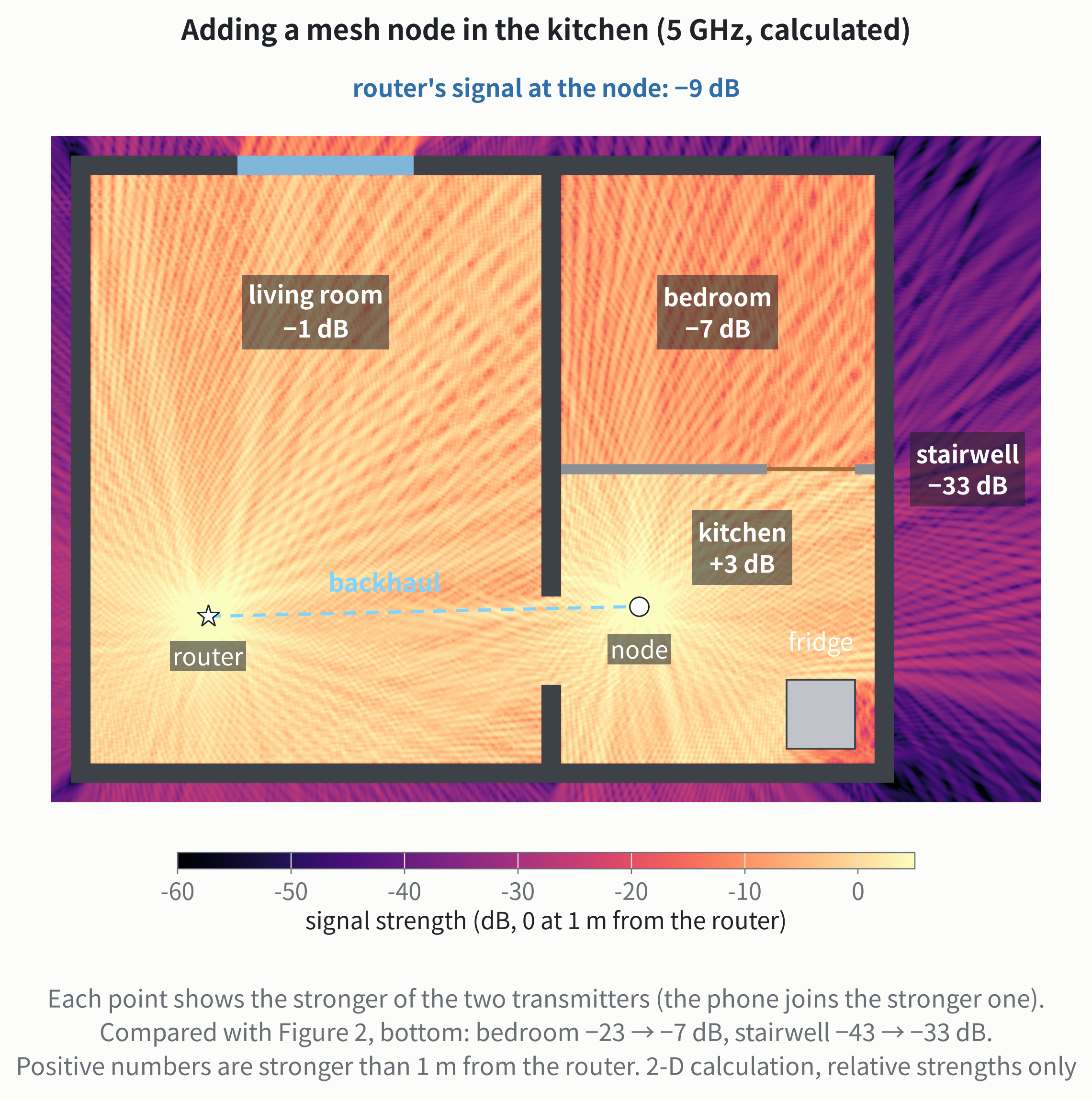
Trying it in the calculation above: a node at the kitchen doorway receives the main router at about −9 dB, still fairly good. The bedroom gains 16 dB at once; the stairwell only 10 dB: the node shortens the distance and the detour, but it cannot remove the concrete wall.
The microwave goes on, the Internet stalls
A microwave oven’s magnetron works at 2.45 GHz, right inside the 2.4 GHz Wi-Fi band. That is no coincidence: this band was set aside internationally for industrial, scientific and medical (ISM) equipment, and a microwave oven is such equipment. In 1985 the US Federal Communications Commission allowed low-power communication devices to use the ISM bands without a licence, and Wi-Fi and Bluetooth later moved in.
An oven’s metal case and the metal mesh in its door block almost all the microwaves, but a little always leaks. The trouble is how far apart the powers are: the magnetron produces about 1000 W, the router sends only about 0.1 W, and after two walls less than a nanowatt often reaches the phone.
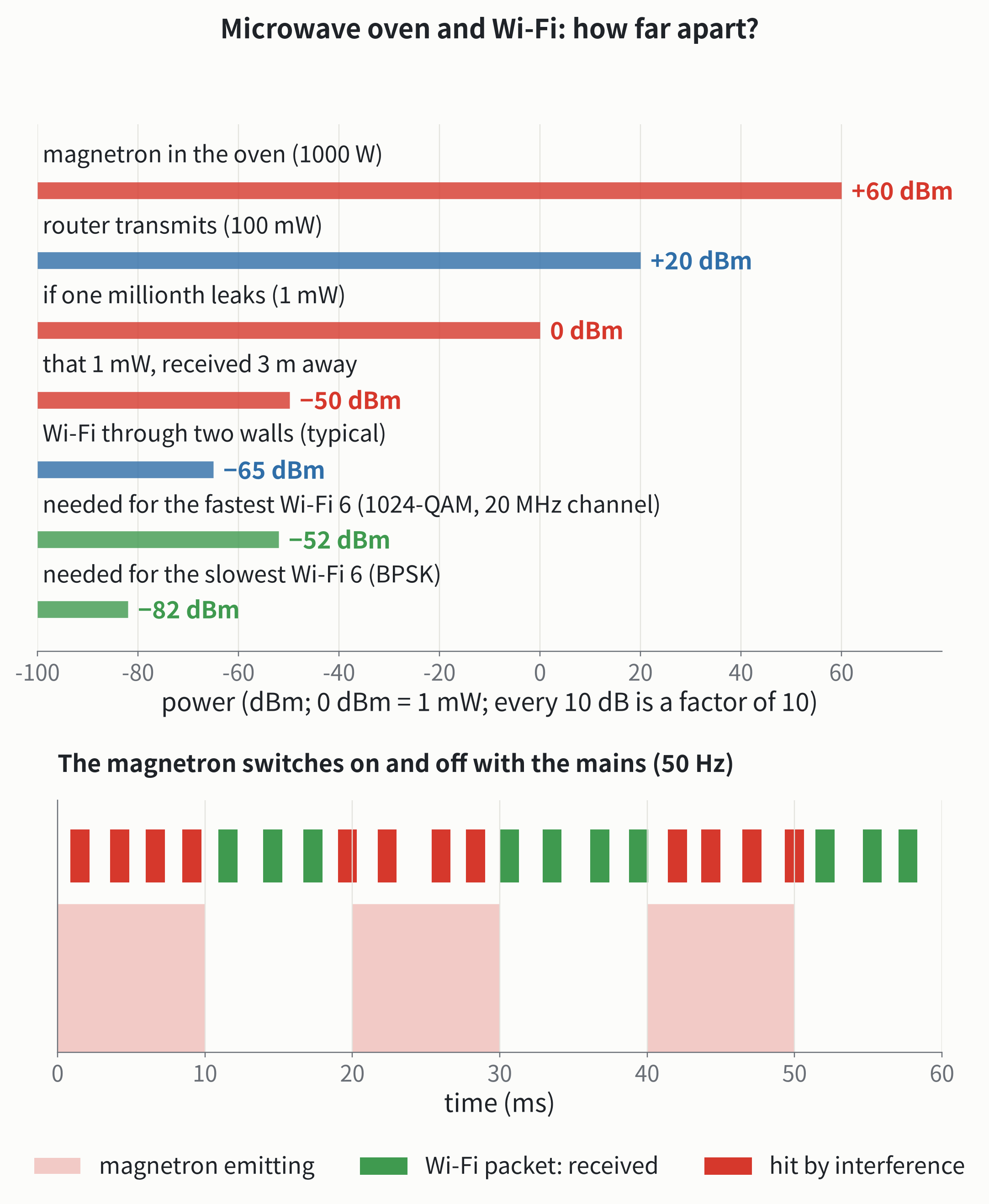
Even one millionth of the power, a few metres away, is stronger than the Wi-Fi signal (US rules allow leakage of up to 5 mW per square centimetre at 5 cm from the oven; real ovens are usually far below that). Fortunately most magnetrons only work during half of each mains cycle, on and off, so Wi-Fi is disrupted in bursts: slower speeds and stuttering video, but rarely a complete drop.
5 GHz Wi-Fi is far from 2.45 GHz and practically unaffected. If the microwave makes your Wi-Fi stall, switch your phone to 5 GHz.
Black-hole hunters and Wi-Fi’s “echoes”
Waves bouncing around a home mean the same signal takes several routes and arrives at slightly different times, like hearing a string of echoes when you shout in a valley. The faster data is sent, the shorter each bit, and the more easily the echo of one bit lands on the next, making it hard to read. Early wireless networks were slow and unreliable largely because of this.
One solution: instead of cramming data onto one frequency and sending it fast, spread it over many neighbouring frequencies and send slowly on each; the bits get longer and the echoes stop mattering; at the receiver, separate the frequencies again and reassemble the data. The idea was proposed in the 1960s, and in 1971 came the idea of separating the frequencies with a Fourier transform. The hard part was making it actually work, fast and cheaply, in a room full of echoes.
A key step came from a group of radio astronomers. In the 1970s the Australian engineer John O’Sullivan, working at a radio observatory in the Netherlands, used a radio telescope to search for the “exploding black holes” predicted by Hawking: a small black hole evaporating to its end would burst, perhaps giving off an extremely short radio pulse, smeared out by interstellar matter on its way to Earth. Recovering a pulse from such a blurred signal relies on the Fourier transform. No black holes were found, but the skill stayed. Back in Australia, at CSIRO, he and his colleagues built the Fourier transform into fast chips and, together with error-correcting codes and other techniques, made wireless networks fast and reliable even in a room full of echoes. They applied for a patent in 1992; the method went into the Wi-Fi standards, and today’s Wi-Fi 6 and Wi-Fi 7 still send data this way.
In a sentence: Wi-Fi is an electromagnetic wave a few centimetres long that passes through walls, reflects and squeezes round doorways in a home; moisture and impurities in walls absorb its energy, more so at higher frequency, so 5 GHz is faster close by but more afraid of walls. When the signal weakens, fewer bits fit in each step and the speed drops. A microwave oven works at 2.45 GHz; even a millionth of its power leaking out can be stronger than Wi-Fi a few metres away, so it disrupts 2.4 GHz but not 5 GHz. Mesh routers don’t make the signal better at passing walls; they bring the transmitter closer, putting fewer walls in its way.
Try it yourself
- Find the pattern in the signal: some phones show the signal strength (dBm) in their Wi-Fi settings, or you can use a Wi-Fi analyser app. A few metres from the router, move the phone slowly by a few centimetres; the number sometimes changes by several decibels: that is waves adding and cancelling, strong and weak spots about half a wavelength apart.
- Microwave test: connect your phone to 2.4 GHz, stand next to the microwave and run a speed test with the oven on and off; then switch to 5 GHz and repeat.
What we don’t know yet
Exactly where the signal will be strong or weak in a home depends on every wall and piece of furniture, even where people walk, and is hard to predict. Engineers are trying to let routers “see” the room: steering the waves with many antennas to aim them at the phone, or, the other way round, using Wi-Fi reflections to sense whether someone is moving in the room. Higher-frequency Wi-Fi can be faster but is even more afraid of walls; how best to trade speed against reach is still being explored.
Going further: numbers, formulas and sources
Wavelengths. : about 12.5 cm at 2.4 GHz, 6.0 cm at 5 GHz, 5.0 cm at 6 GHz.
Wall loss. ITU-R P.2040 gives the relative permittivity and conductivity of building materials ( in GHz): concrete , , ; plasterboard 2.73, 0.0085, 0.9395; wood 1.99, 0.0047, 1.0718; glass 6.31, 0.0036, 1.3394. For small losses a wave decays in the material as (nepers per metre), times 8.686 for decibels. Concrete loses about 65 dB per metre at 2.4 GHz and 116 dB per metre at 5 GHz; for 20 cm, plus reflection at the two surfaces, about 15 and 25 dB. Measured values vary widely with moisture, reinforcement and thickness.
The calculation in Figures 1, 2 and 3. A two-dimensional finite-difference time-domain (FDTD) solution with the electric field perpendicular to the page, grid spacing a twentieth of a wavelength (about a ninth of the wavelength inside concrete), time step 0.6 times the grid spacing divided by the speed of light; an 8 m × 6 m flat surrounded by a gradually absorbing layer that imitates open space. The fridge is treated as perfect metal. In two dimensions a spreading wave’s power falls as (in three dimensions ), so the numbers can only be compared with each other, not taken as real signal strengths. Figures 2 and 3 average over squares half a wavelength across, and the number in each room is the average power over the whole room. Two checks: averages over the last two periods and at a time 20% earlier differ by less than 0.3 dB in every room, so the field has settled; refining the grid from a twelfth to a twentieth of a wavelength changes the room averages by 0 to 3 dB, so the numbers are good to a few decibels.
Speed and signal. Wi-Fi 6 (IEEE 802.11ax) minimum receiver sensitivity for a 20 MHz channel at 10% packet error rate: MCS0 (BPSK, rate 1/2) −82 dBm, MCS7 (64-QAM, 5/6) −64 dBm, MCS11 (1024-QAM, 5/6) −52 dBm; 3 dB more for each doubling of channel width. Single-stream 20 MHz rates (0.8 µs guard interval): MCS0 about 8.6 Mbit/s, MCS7 about 86, MCS11 about 143. Thermal noise over 20 MHz is about −101 dBm.
Mesh. Figure 3 combines two calculations, with a source of the same power at the router and at the node (just inside the kitchen doorway), taking the stronger at each point. A single radio relaying on one channel must split its airtime in two, roughly halving the speed; tri-band mesh uses another 5 GHz channel for backhaul, or a cable does. The phone decides when to move to another node; the 802.11k, v and r protocols help it find a better node and switch faster.
Microwave ovens. Free-space path loss at 3 m is dB (2.45 GHz); 1 mW is 0 dBm, about −50 dBm at 3 m. US rule 21 CFR 1030.10: at most 1 mW per cm² at 5 cm from the surface when new, 5 mW per cm² during use. Transformer-powered magnetrons only work on one half of each mains cycle, so the interference has a duty cycle of about 50%; inverter ovens differ.
Sources. ITU-R P.2040 (effects of building materials on radio-wave propagation). IEEE 802.11ax-2021. IEEE 802.11-98/240, effects of microwave interference on wireless LANs (1998). J. O’Sullivan et al., US patent 5487069 (granted 1996, Australian application 1992); 2009 Australian Prime Minister’s Prize for Science. Early OFDM: R. Chang, Bell System Technical Journal 45, 1775 (1966); with the discrete Fourier transform: S. Weinstein and P. Ebert, IEEE Trans. Commun. Technol. 19, 628 (1971). The search for exploding black holes: J. O’Sullivan, R. Ekers and P. Shaver, Nature 276, 590 (1978).